This guide will take you through all the Roadrunner email settings, Spectrum Webmail and TWC Email settings for POP3, IMAP and SMTP.
Contents
- 1 Roadrunner, Spectrum, and TWC Email Settings Guide
- 2 What Are Roadrunner, TWC, and Spectrum Email?
- 3 Can You Still Use an Old Roadrunner or TWC Email Address?
- 4 Where Do You Access These Accounts?
- 5 Roadrunner, TWC, and Spectrum Incoming and Outgoing Mail Settings
- 6 Which Settings Should Most People Use?
- 7 What Is the Difference Between POP3, IMAP, and SMTP?
- 8 Why IMAP Is Usually Better for Spectrum, Roadrunner, and TWC Email
- 9 When POP3 Might Still Make Sense
- 10 How to Set Up Spectrum, Roadrunner, or TWC Email in a Mail App
- 11 Common Setup Mistakes
- 12 Helpful Notes About Legacy Branding
- 13 FAQ: Spectrum, Roadrunner, and TWC Email Settings
- 13.1 What are the outgoing SMTP settings for Roadrunner email?
- 13.2 What are the IMAP settings for Roadrunner email?
- 13.3 What are the POP3 settings for Roadrunner email?
- 13.4 What are the SMTP settings for Spectrum email?
- 13.5 What are the IMAP settings for Spectrum webmail email?
- 13.6 What are the POP settings for Spectrum email?
- 13.7 What are the TWC email SMTP settings?
- 13.8 What are the TWC email IMAP settings?
- 13.9 What are the TWC POP3 settings?
- 13.10 Should I use IMAP or POP for Spectrum, Roadrunner, or TWC email?
- 13.11 What does SMTP mean in email settings?
- 13.12 What does IMAP mean in email settings?
- 13.13 What does POP3 mean in email settings?
- 13.14 Why is IMAP usually recommended over POP3?
- 13.15 Can I still use POP3 if I want offline access?
- 13.16 Why am I receiving emails but not able to send them?
- 13.17 Why am I not receiving emails in my Roadrunner account?
- 13.18 Why does my email app keep asking for the password?
- 13.19 Do I need to use my full email address as the username?
- 13.20 What port should I use for SMTP?
- 13.21 What port should I use for IMAP?
- 13.22 What port should I use for POP3?
- 13.23 Can I use these settings in Outlook?
- 13.24 Can I use these settings in Thunderbird?
- 13.25 Can I use these settings on an iPhone?
- 13.26 Can I use these settings on Android?
- 13.27 Why do older guides show different server names?
- 13.28 Can I still log in through Spectrum webmail if my address is @rr.com?
- 13.29 Can I create a new Roadrunner or TWC email address today?
- 13.30 What should I do if webmail works but my mail app does not?
- 13.31 Why are my sent emails stuck in the outbox?
- 13.32 Why do I see old messages on one device but not another?
- 13.33 Can I switch from POP3 to IMAP later?
- 13.34 Is there any reason to keep using POP3 today?
- 13.35 What is the easiest setup for a non-technical user?
- 13.36 How can I reduce troubleshooting problems with an old Roadrunner or TWC mailbox?
- 13.37 Are these legacy mailboxes still worth keeping?
Roadrunner, Spectrum, and TWC Email Settings Guide
If you still use an old Roadrunner email address, you are not alone. Many people continue using email accounts ending in @rr.com, @roadrunner.com, or @twc.com because those addresses are tied to bills, family contacts, shopping accounts, and years of saved messages. The confusing part is that Roadrunner and Time Warner Cable branding changed, while the email accounts themselves often stayed active, so users are left searching for the right login page and the right mail settings long after the original branding disappeared.
This guide explains the most important email settings in simple language. It covers Spectrum webmail email settings, Roadrunner email settings, and TWC email settings for IMAP, POP3, and SMTP. It also explains what those terms mean, which setup is best for most people, why older settings can be confusing, and how to avoid common mistakes when setting up your email on a phone, tablet, or desktop app.
The short version is this. Most legacy Roadrunner and TWC accounts now live under the Spectrum platform, which means the email address may still be old, but the service behind it is now usually associated with Spectrum. That is why people often search for all three names at once. They are trying to connect an old address to a newer login and mail system.
What Are Roadrunner, TWC, and Spectrum Email?
Roadrunner Email was originally offered through Time Warner Cable. Later, after major company changes and rebranding, many of these email accounts became tied to Spectrum services. So even if your address still ends in @rr.com or @twc.com, you may still access it through Spectrum webmail and use Spectrum-compatible mail settings in your email app.
That is the part many users find frustrating. The address looks old. The login page looks new. And the server settings sometimes show older values that still circulate online. Once you understand that these are legacy accounts now supported under a newer platform, the situation becomes much easier to manage.
Can You Still Use an Old Roadrunner or TWC Email Address?
In many cases, yes. Existing legacy accounts may still work if they were created years ago and remain active. However, people usually cannot create a brand-new Roadrunner or TWC email address today the way they could in the past.
So if you already have a Roadrunner, RR, or TWC email account, the goal is usually not creating a new one. It is accessing the existing one properly, keeping it secure, and setting it up correctly in webmail or in a mail app such as Outlook, Apple Mail, Thunderbird, or a phone’s built-in Mail app.
Where Do You Access These Accounts?
Many users access their legacy email through Spectrum Webmail. That is why people who still think of the account as “Roadrunner email” often end up signing in through a Spectrum-branded page instead of an old Roadrunner login page.
This is normal. It does not mean your email address changed. It simply means the service behind it is now managed through Spectrum.
Roadrunner, TWC, and Spectrum Incoming and Outgoing Mail Settings
If you use webmail in a browser, you may not need to enter any manual settings at all. But if you use an email app, you usually need to know the incoming server settings and the outgoing server settings. These settings tell your app where to receive mail from and where to send mail through.
Common SMTP Settings for Sending Email
SMTP is the outgoing mail server. This is the setting your email app uses when you send messages.
- SMTP Host: mail.twc.com
- SMTP Port: 587
- Security: SSL/TLS or STARTTLS depending on the app
- Username: Your full email address
- Password: Your email password
Some users may also see references online to newer Spectrum server names, while many legacy setup guides still use mail.twc.com. That is one reason setup can feel inconsistent. If one server name does not work in your app, verify whether your account or device expects a Spectrum-specific server entry instead.
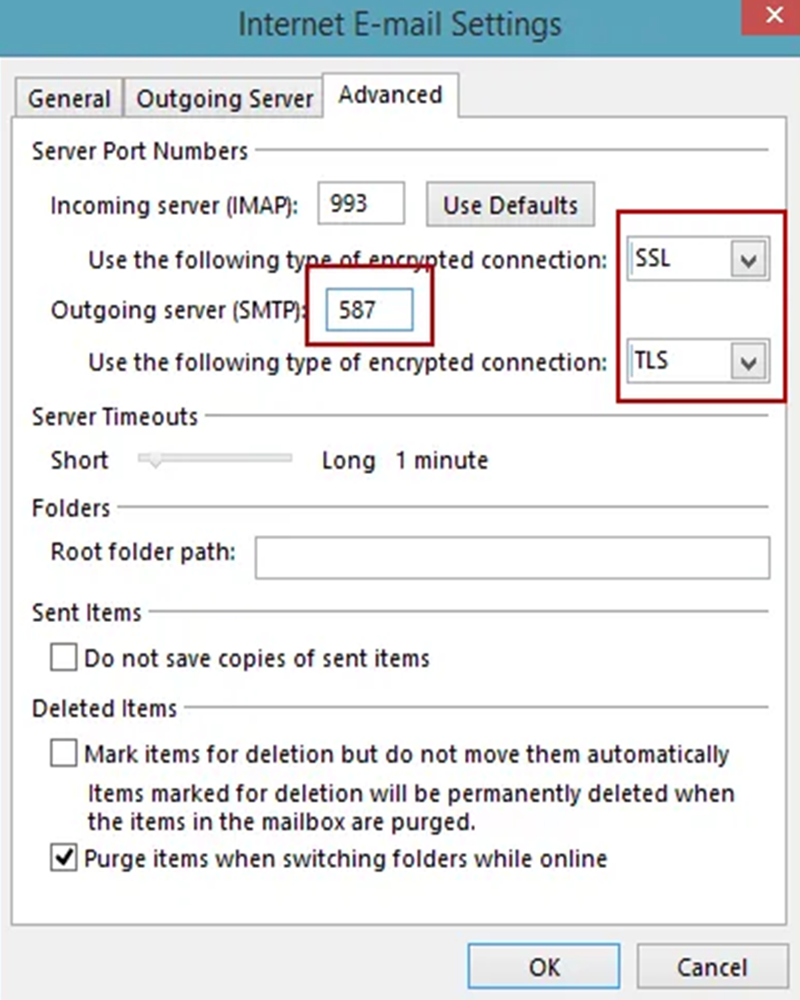
Common IMAP Settings for Receiving Email
IMAP is the modern receiving method most people should use. It keeps email synchronized across devices so that if you read or delete a message on your phone, the same change appears on your laptop and in webmail.
- IMAP Host: mail.twc.com
- IMAP Port: 993
- Security: SSL
- Username: Your full email address
- Password: Your email password
Common POP3 Settings for Receiving Email
POP3 is the older receiving method. It downloads mail to one device and does not handle syncing across multiple devices nearly as well as IMAP. It still exists, but most users should choose IMAP unless they have a very specific reason to use POP.
- POP3 Host: mail.twc.com
- POP3 Port: 995
- Security: SSL
- Username: Your full email address
- Password: Your email password
Which Settings Should Most People Use?
For most users, IMAP + SMTP is the best choice. It is better for phones, tablets, laptops, and people who check email in more than one place. It is also the better option if you want your inbox, sent folder, and deletions to stay consistent everywhere.
POP3 is more old-fashioned. It can still work, and some people prefer it for one-device setups or for downloading mail locally, but it is usually not the easiest choice anymore. Short version: if you are unsure, use IMAP.
What Is the Difference Between POP3, IMAP, and SMTP?
These three terms sound technical, but the idea is simple once you break them apart.
SMTP is for sending mail. Every time you click Send, your email app uses SMTP.
IMAP is for receiving mail in a modern, synced way. It keeps messages on the server and lets multiple devices stay updated together.
POP3 is for receiving mail in an older, more device-specific way. It was designed more for downloading messages onto one machine, and while modern POP3 can sometimes leave copies on the server, it is still less flexible than IMAP.
Why IMAP Is Usually Better for Spectrum, Roadrunner, and TWC Email
Most people no longer check email on just one desktop computer. They check it on a phone while traveling, on a laptop at home, and sometimes through webmail in a browser too. IMAP was built for that kind of real-life behavior.
That is why IMAP is usually the recommended setup for legacy Roadrunner and TWC accounts now accessed through Spectrum. It keeps everything more consistent. And it creates fewer headaches.
When POP3 Might Still Make Sense
POP3 can still be useful in a few situations. For example, some people prefer keeping email downloaded to one local computer, especially if they have a slow or unreliable internet connection or if they simply like the older style of email management. In those cases, POP3 may still feel more familiar.
But there is a tradeoff. POP3 is less convenient when you use multiple devices, and it can create confusion if messages appear on one device but not another. That is why POP is usually no longer the default recommendation.
How to Set Up Spectrum, Roadrunner, or TWC Email in a Mail App
The safest order is simple. First, make sure you can sign in through webmail. Then, once you know the account itself works, add it to your email app.
- Open your email app.
- Choose Add Account or Manual Setup.
- Enter your full email address and password.
- Select IMAP unless you specifically need POP3.
- Enter the incoming and outgoing server settings.
- Save the account and test sending and receiving.
If receiving works but sending does not, the problem is usually the SMTP settings. If neither works, double-check the full email address, password, port numbers, and security settings. Very small errors matter here.
Common Setup Mistakes
Most configuration problems come from a handful of repeated mistakes.
- Using the wrong domain in the email address
- Forgetting to enter the full email address as the username
- Using POP when IMAP would be better
- Using the wrong SMTP port
- Selecting the wrong security type
- Relying on an old saved password
This is why email setup can feel harder than it should. One field out of place can break the whole connection. Annoying, yes. But usually fixable.
Helpful Notes About Legacy Branding
Older guides may still mention Roadrunner, RR, or TWC as if they were still separate active platforms. In practice, many users now access those legacy addresses through Spectrum webmail and use settings that reflect Spectrum’s support for those older accounts. That is why you may see mixed terminology in setup articles and forum posts.
Do not let that throw you off. If your address is old but your access path is Spectrum, that is completely normal for a legacy ISP email account.
FAQ: Spectrum, Roadrunner, and TWC Email Settings
What are the outgoing SMTP settings for Roadrunner email?
The commonly referenced Roadrunner SMTP server is mail.twc.com using port 587. Your email app should also use your full email address as the username and your normal email password as the password. In many apps, you will also need to enable SSL, TLS, or STARTTLS so the connection is secure and the mail app can send properly.
What are the IMAP settings for Roadrunner email?
The commonly listed IMAP server is mail.twc.com on port 993 with SSL enabled. You should enter your full email address, not just the part before the @ sign, as the username. IMAP is usually the best option because it keeps your inbox synchronized across multiple devices and webmail.
What are the POP3 settings for Roadrunner email?
The traditional POP3 server is mail.twc.com with port 995 and SSL enabled. As with IMAP, the username is usually your full email address and the password is your mailbox password. POP3 can still work, but it is normally less convenient than IMAP if you check email in more than one place.
What are the SMTP settings for Spectrum email?
Many legacy Spectrum-related accounts still use mail settings that overlap with older Roadrunner and TWC guidance, including SMTP server references such as mail.twc.com or, in some cases, other Spectrum-specific server names depending on the setup. The outgoing port is commonly 587, and secure authentication is important. If your app rejects the connection, verify the security method and whether the account requires the full email address as the username.
What are the IMAP settings for Spectrum webmail email?
For legacy accounts managed through Spectrum, users often rely on IMAP configuration using secure incoming settings such as port 993 with SSL. The exact server name can vary in guides depending on account age and platform references, which is why old and new setup instructions sometimes conflict. The key is to use IMAP if you want your mailbox to stay synced across your phone, computer, and browser.
What are the POP settings for Spectrum email?
POP settings for these legacy mailboxes commonly use port 995 with SSL. POP will download or retrieve messages in a more old-fashioned way and is best for simple single-device use cases. Most users today will be happier with IMAP because POP can create confusion when messages do not match across devices.
What are the TWC email SMTP settings?
TWC email setup guides commonly list mail.twc.com as the SMTP host with port 587. Secure login and the full email address as the username are usually required. If messages get stuck in the outbox, the issue is often the SMTP configuration rather than the inbox settings.
What are the TWC email IMAP settings?
The common IMAP setup for TWC email uses mail.twc.com, port 993, and SSL. You should use the full @twc.com email address if that is your real address. This setup is best if you want your emails to remain visible and consistent across several devices.
What are the TWC POP3 settings?
The commonly listed TWC POP3 settings are mail.twc.com, port 995, with SSL enabled. This allows older-style message retrieval to a mail program. It can still work, but most users do better with IMAP because it is easier to manage when using phones and laptops together.
Should I use IMAP or POP for Spectrum, Roadrunner, or TWC email?
For most people, IMAP is the better choice. It is more modern, easier to use across devices, and much less likely to create confusion when you read or delete messages on one device and expect the same changes to appear elsewhere. POP still has a place for a few users, but it is no longer the easiest or most flexible default.
What does SMTP mean in email settings?
SMTP stands for Simple Mail Transfer Protocol. In everyday terms, it is the outgoing mail system that your app uses when you send an email. If your inbox receives messages but cannot send them, the SMTP settings are one of the first places to check.
What does IMAP mean in email settings?
IMAP stands for Internet Message Access Protocol. It is the method that lets your email app view and manage mail while keeping the messages stored on the server. That is why IMAP is good for people who use webmail, a phone, and a computer all at the same time.
What does POP3 mean in email settings?
POP3 stands for Post Office Protocol version 3. It is an older way of retrieving email that was designed more for downloading messages to one device. It still works in many cases, but it does not handle modern multi-device use nearly as smoothly as IMAP.
Why is IMAP usually recommended over POP3?
IMAP is usually recommended because it is built for syncing email across several devices. That means what you do in one place, such as deleting, reading, or moving a message, is usually reflected in the others. POP3 is more limited and can lead to an inbox that looks different depending on which device you use.
Can I still use POP3 if I want offline access?
Yes, POP3 can still make sense if your priority is downloading messages to one device and keeping them there. Some users prefer that because they want local control or because they work with limited internet access. The tradeoff is that POP is less convenient if you also expect perfect syncing on your phone or in webmail.
Why am I receiving emails but not able to send them?
That usually points to an SMTP problem. The outgoing server name, port number, security setting, or authentication field may be wrong, even if the incoming settings are correct. In many cases, fixing the SMTP port and making sure the full email address is used as the login will solve the issue.
Why am I not receiving emails in my Roadrunner account?
First, check whether the password is still correct and whether webmail works. If webmail works but your app does not, the incoming IMAP or POP settings are probably wrong, or the app may be using an outdated saved password. Spam folders, quota limits, and broken sync settings can also delay or hide incoming mail.
Why does my email app keep asking for the password?
This often means the app has the wrong password saved, or it is using the wrong authentication settings. It can also happen if the username is incomplete and does not include the full email address. Delete the saved password, re-enter everything carefully, and check the server settings again.
Do I need to use my full email address as the username?
Yes, in most cases you do. That means entering the entire address, such as [email protected] or [email protected], not just the first part. Leaving off the domain is a very common cause of setup failure.
What port should I use for SMTP?
The commonly listed SMTP port is 587. Some apps may also ask you to choose a security type such as SSL, TLS, or STARTTLS, and that choice matters. If the port or security type is wrong, the app may look connected but still fail to send messages.
What port should I use for IMAP?
The common IMAP port is 993. This is usually paired with SSL for a secure incoming mail connection. If your app cannot connect to the inbox, double-check both the port and the SSL setting.
What port should I use for POP3?
The common POP3 port is 995. This is also usually used with SSL. If your app is trying an older non-secure port by default, changing it to 995 can sometimes fix the connection immediately.
Can I use these settings in Outlook?
Yes, many users configure Spectrum, Roadrunner, or TWC email in Microsoft Outlook. Outlook can work well, but it often requires manual setup if automatic detection fails. It is a good idea to test the account in webmail first so you know the email itself still works before you troubleshoot Outlook-specific issues.
Can I use these settings in Thunderbird?
Yes, Thunderbird can usually work with these settings too. It is a popular choice for users who want a desktop client without using a browser all the time. Just be careful with the server names, ports, and security settings because Thunderbird is only as good as the information entered into it.
Can I use these settings on an iPhone?
Yes, many people add their legacy email accounts to the iPhone Mail app. You may need to choose manual setup and enter the IMAP or POP details along with the SMTP settings. If mail comes in but does not go out, the outgoing server settings are usually the problem.
Can I use these settings on Android?
Yes, Android mail apps often support manual IMAP, POP3, and SMTP configuration. The most important thing is to use the full email address and to check the secure ports carefully. Android setup usually works fine once the correct settings are entered, but a single typo can block the whole process.
Why do older guides show different server names?
Because these are legacy email services with years of branding changes behind them. Some guides still refer to Roadrunner or TWC server values, while others mention Spectrum webmail or newer service language. This overlap confuses users, but it usually reflects the history of the platform rather than a completely different type of email account.
Can I still log in through Spectrum webmail if my address is @rr.com?
Yes, that is common for legacy accounts. The domain on the email address does not have to match the modern branding of the login page. Many people with old RR or TWC addresses now access them through Spectrum webmail.
Can I create a new Roadrunner or TWC email address today?
Generally, no. These are considered older legacy email identities, not brand-new sign-up products in the way they once were. Most users asking about them now are trying to continue using or recover an existing account rather than create a new one.
What should I do if webmail works but my mail app does not?
That is actually good news because it means the email account itself is probably fine. The problem is most likely in the app configuration, especially the server settings, password storage, or security options. Focus on checking IMAP, POP, and SMTP settings one field at a time instead of assuming the entire account is broken.
Why are my sent emails stuck in the outbox?
Stuck outbox messages almost always point to an SMTP issue. The outgoing server, port, security type, or login credentials are likely incorrect. Fixing the SMTP settings usually solves this, even when the inbox appears to be working normally.
Why do I see old messages on one device but not another?
This often happens when one device is using POP3 and another is using IMAP, or when POP settings are downloading messages locally in a way that does not sync well. It can also happen when folders are mapped differently in different apps. Using IMAP consistently across all devices usually makes the mailbox much easier to manage.
Can I switch from POP3 to IMAP later?
Yes, but it should be done carefully. POP3 and IMAP handle mail differently, so switching without planning can lead to duplicate messages, missing folders, or confusion about what is stored locally versus on the server. If the mailbox is important, back up key emails first and make the change methodically.
Is there any reason to keep using POP3 today?
For a small number of users, yes. Some people prefer local download behavior, single-device email use, or older workflows they are comfortable with. But for most people using phones, tablets, laptops, and webmail, IMAP is simpler, safer, and easier to live with.
What is the easiest setup for a non-technical user?
Webmail is usually the easiest because it avoids manual server setup altogether. If you prefer using a mail app, choose IMAP and enter the settings slowly and carefully. The fewer moving parts you introduce, the fewer things can go wrong.
How can I reduce troubleshooting problems with an old Roadrunner or TWC mailbox?
Start by confirming the account works in webmail. Then use the full email address, the correct secure ports, and IMAP unless you have a strong reason to use POP3. Also, avoid mixing old saved passwords, outdated app settings, and half-finished configurations across several devices because that is where most frustration begins.
Are these legacy mailboxes still worth keeping?
For many people, yes, because the address may still be tied to old contacts and important accounts. That said, older ISP-based email addresses are often less convenient than modern mainstream providers, so some users eventually keep the old mailbox as a backup while moving important services to a newer address. It does not have to be an all-or-nothing decision.